Instatic CMS: The Complete Technical Guide (2026)
TL;DR: - Instatic CMS is an open-source, self-hosted visual website builder that compiles to static HTML and CSS — no framework runtime on published pages. - One Bun server handles the canvas editor, content database, media, forms, plugins, and publishing. SQLite or Postgres. - Core Framework's design-token engine is built in, generating color shades, fluid type scales, and spacing from a single config. - Deployment costs $0–$5/month via Docker, Railway, or Render. MIT licensed with 4,200+ GitHub stars. - Version 0.0.x as of July 2026 — APIs may shift before 1.0, but the architecture is production-stable for single sites.
- 1. Who Built Instatic CMS?
- 2. Instatic CMS Technical Architecture
- 3. Core Framework Integration
- 4. Visual Components and Content Model
- 5. Instatic Deployment Options
- 6. Instatic vs Webflow vs WordPress vs Astro
- 7. Who Should Use Instatic CMS?
- 8. Instatic Limitations and Tradeoffs
- 9. Getting Started with Instatic
- 10. FAQ
- 11. Further Reading
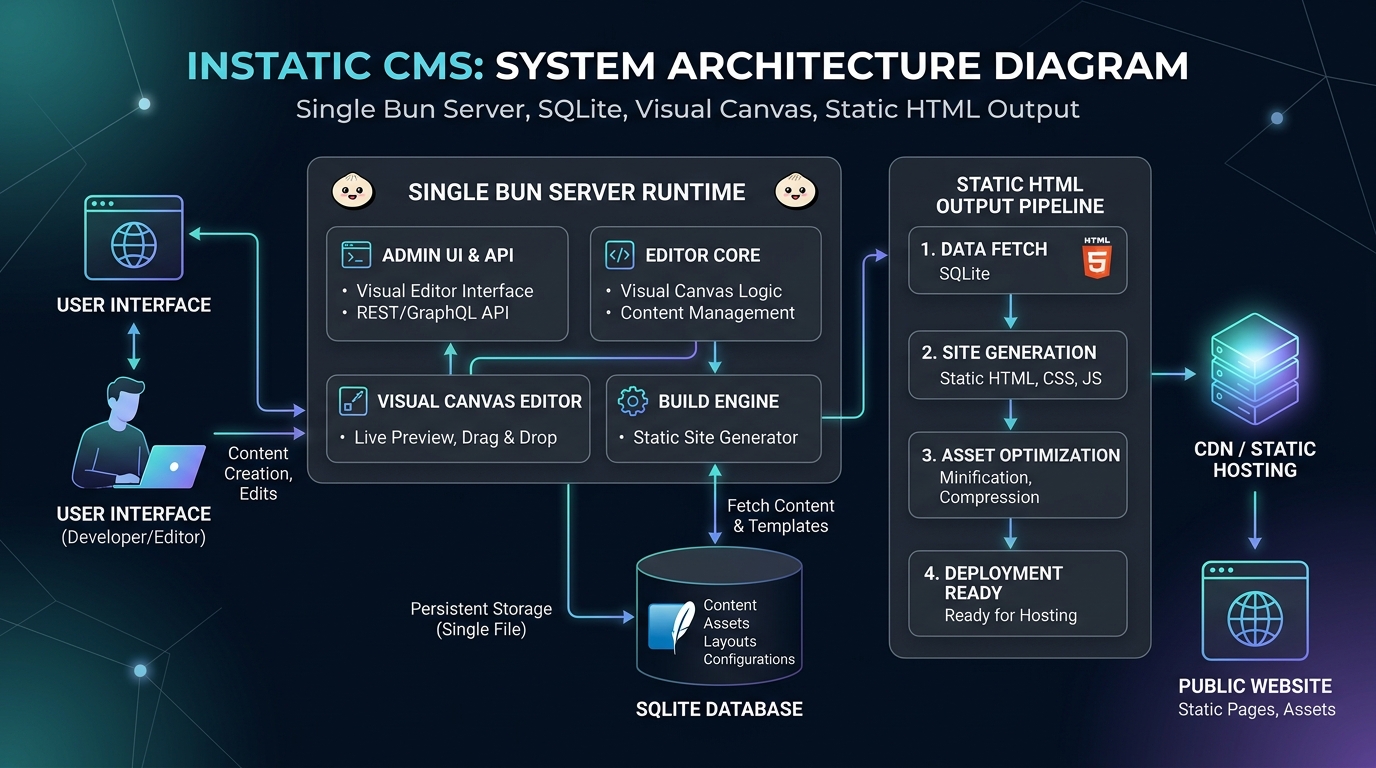
Instatic CMS is a self-hosted, open-source visual website builder that compiles design tokens, content, and layouts into clean static HTML and CSS — eliminating the need for separate frontend frameworks, hosting platforms, and form services. Built by the CoreBunch team (makers of Motion.page and Core Framework), Instatic runs on a single Bun server and outputs pages lightweight enough to read in view-source. This guide covers Instatic's architecture, deployment paths, and how it compares to Webflow, WordPress, and Astro-based stacks.
Who Built Instatic CMS?
CoreBunch is a bootstrapped software team that created Instatic after their previous product lost 80% of revenue to AI coding tools.
The team behind Instatic — David Babinec and Rameez — previously built Motion.page (a visual animation tool for WordPress) and Core Framework (a design-token engine used by thousands of WordPress professionals working with builders like Bricks and Oxygen). Core Framework's revenue dropped sharply as AI-assisted coding tools made design-token configuration easier for non-specialists. Rather than continuing to build plugins for existing platforms, the team pivoted to develop a standalone visual publishing platform.
Instatic is the result: a unified CMS that combines the visual editing experience of Webflow with the self-hosted control of WordPress and the static output of a Jamstack generator. The project is MIT licensed with no open-core asterisks, no "contact sales" tier, and no vendor lock-in.
Single-source claim: The 80% revenue decline figure comes from the original research document provided for this post. CoreBunch has not publicly disclosed exact revenue figures. This claim should be treated as approximate.
Instatic CMS Technical Architecture
Instatic runs on a single Bun server that combines a visual canvas editor, SQLite or Postgres database, sandboxed WebAssembly plugins, and a static HTML compiler.
The canvas editor displays real DOM badges on each node (showing section, div, article, etc.) and allows side-by-side editing across Desktop, Tablet, and Mobile breakpoints. The technical stack breaks down as follows:
| Component | Technology |
|-----------|------------|
| Runtime | Bun (server + tooling) |
| Language | TypeScript |
| Admin UI | React 19 (React Compiler enabled), Vite, Zustand + Mutative, CodeMirror, dnd-kit |
| Server | Bun.serve with hand-written router |
| Database | SQLite or PostgreSQL via a single DbClient interface |
| Validation | TypeBox at every untyped boundary |
| Plugin sandbox | QuickJS-WASM (no filesystem, no env vars, no network unless granted) |
| AI integration | Provider-agnostic drivers over raw HTTP/SSE (Claude, OpenAI, OpenRouter, Ollama) |
| Public output | Semantic HTML, compact CSS, 1.1 kB runtime |
The architecture eliminates the traditional headless CMS stack. Instead of connecting a headless CMS → frontend framework → hosting platform → form service → analytics vendor — each with its own bill and dashboard — Instatic consolidates everything into one process.
How the Static Publisher Works
Instatic's publisher operates in three layers:
1. Static pages bake straight to disk on publish and swap atomically. Visitors receive a file, not a server render. 2. Routes with dynamic behavior hit a versioned in-memory cache. Publishing bumps the version, so stale entries miss lazily. 3. Per-visitor elements are detected automatically and lazy-loaded by a runtime weighing 1.1 kB.
The output is plain HTML and compact CSS. No React on public pages, no editor runtime, no framework attributes in the markup. The site loads like a static file because it is one.
Plugin Security Model
Instatic plugins run in per-plugin worker threads hosting a QuickJS-WASM sandbox. Plugins have no filesystem access, no environment variables, and no network access unless the site owner explicitly grants it — one host at a time. Editor extensions require the explicit editor.code permission before installation.
Through the SDK, plugins can add HTTP routes, admin pages, storage, background jobs, loop data sources, canvas modules, media adapters, and lifecycle hooks.
Core Framework Integration
Core Framework is a built-in design-token engine that generates color shades, fluid type scales, and spacing ramps from a single configuration.
Core Framework is not a plugin — it's wired into Instatic as a core system. The same engine that thousands of WordPress professionals use in Bricks and Oxygen is the foundation of Instatic's design layer.
Key capabilities:
- Color tokens with auto-generated shade scales. Define one brand color, get a complete palette of tuned tints and shades automatically.
- Fluid type scales. One mathematical ramp that scales with the viewport instead of dozens of hand-picked font sizes.
- Spacing scales. Every page and breakpoint maintains consistent rhythm.
- Utility-class generator. Emits locked classes into a single
framework.cssfile. No bloat, no duplicate rules.
Visual Components and Content Model
Instatic uses a unified data model where pages, posts, custom collections, form submissions, and visual components all share one store: data_tables and data_rows.
There is no special-cased "pages" table. Schemas, raw rows, imports, exports, and form submissions all sit in one consistent place. At /admin/data, you create custom post types and data tables with their own fields, then work the rows in a spreadsheet-style grid with search, sort, filter, bulk publish, and bulk export.
Visual Components with Typed Parameters
Reusable UI components support typed parameters and named content slots:
| Parameter type | Use case | |----------------|----------| | String | Labels, headings, short text | | Number | Counts, prices, dimensions | | Boolean | Show/hide toggles | | Color | Brand accents, background tints | | Image | Hero images, avatars, thumbnails | | URL | Links, redirects | | Rich text | Descriptions, body copy | | Enum | Predefined options (style variants) | | Content slot | Nested child layouts |
Editing a master component updates every instance site-wide. Instatic blocks circular component references before they happen, preventing infinite loops.
Native Forms
Forms placed on the canvas read input fields and automatically generate matching database tables in the CMS. Submissions land in your own data tables — no third-party form service, no embed, no monthly fee for a contact form.
Instatic Deployment Options
Instatic deploys via one-click Railway templates ($5/month), Render, or Docker on any VPS.
| Provider | Database | Best for | Cost | |----------|----------|----------|------| | Railway | SQLite | Single site (blog, portfolio, small business) | ~$5/month | | Railway | Postgres | Multiple authors, managed backups | ~$10–20/month | | Render | SQLite or Postgres | Teams preferring Render's infrastructure | Varies | | Docker / VPS | SQLite or Postgres | Full control, custom backup policy | $0 (your server) |
One-Click Railway Deploy
Railway is the recommended path. The template provisions the Docker container (ghcr.io/corebunch/instatic:latest) and attaches a persistent block volume at /app/storage — ensuring the SQLite database, uploaded media, custom fonts, and compiled static assets survive container restarts and version redeploys. Railway generates the INSTATIC_SECRET_KEY automatically for encrypting LLM API keys and MFA settings. Deployment takes under two minutes at a flat ~$5/month compute cost with no terminal required.
Docker Deployment
For self-managed servers, Instatic publishes a single Docker image at ghcr.io/corebunch/instatic:latest. The minimum viable Docker setup:
INSTATIC_IMAGE=ghcr.io/corebunch/instatic:latest \
docker compose -f compose.prod.yml -f compose.sqlite.yml up -d
The compose configuration mounts local directories for the SQLite database and uploads, so data persists across container restarts. Adding Caddy for TLS termination is documented in the VPS deployment guide.
Local Development
git clone https://github.com/corebunch/instatic.git
cd instatic
bun install
bun run dev
The dev server launches at http://localhost:5173. Running bun run start builds the admin panel and serves it from the Bun server at http://localhost:3001/admin.
Instatic vs Webflow vs WordPress vs Astro
Instatic produces the same static output as Astro, the visual editing of Webflow, and the self-hosted control of WordPress — in a single tool.
| Feature | Instatic | Webflow | WordPress + Elementor | Astro + Headless CMS | |---------|----------|---------|----------------------|---------------------| | Deployment model | Self-hosted Bun server | Hosted SaaS | Self-hosted PHP | Jamstack edge CDN | | Output | Clean semantic HTML | Heavy builder JS | Complex nested DOM | Clean HTML from islands | | Visual editor | Canvas with breakpoints | Full visual workspace | No-code with plugins | Code-first | | Design system | Core Framework tokens | Proprietary panel classes | Theme configuration | Custom Tailwind/CSS | | Forms | Native SQLite/Postgres tables | Cloud SaaS (monthly limits) | Third-party integrations | Third-party or custom APIs | | Security | Low attack surface (static) | Vendor-managed | High attack surface (PHP+MySQL) | Low attack surface (static) | | Vendor lock-in | None (MIT, self-hosted) | Full (proprietary platform) | Partial (theme/plugin deps) | None | | Cost | $0–5/month | $16–36/month | Hosting + plugin fees | $0 (Vercel/Cloudflare free tier) |
vs Webflow
Webflow offers a polished visual editor but locks sites into its proprietary runtime. Published pages ship with builder JavaScript and framework attributes. Hosting costs $16–36/month for basic sites. Instatic provides a comparable visual editing experience with clean static output, self-hosted control, and zero monthly platform fees.
vs WordPress + Elementor
WordPress remains the most widely used CMS but runs on PHP with MySQL, creating a larger attack surface. Elementor adds visual editing but generates complex nested DOM with unminified CSS. Instatic's static output eliminates database queries on public pages and reduces the attack surface to flat files.
vs Astro + Headless CMS
Astro paired with Strapi or Sanity produces excellent static output but requires configuring a build pipeline, managing two systems, and triggering CI/CD deploys on content changes. Instatic combines the content editor and static compiler in one tool with no deployment pipeline to configure.
Who Should Use Instatic CMS?
Instatic suits agencies wanting client-friendly editors, solo developers seeking static performance without code-first SSGs, and teams needing self-hosted control.
Best-fit scenarios:
- Agencies building sites for clients who need a visual editor but shouldn't manage a complex stack
- Solo developers who want Jamstack performance without configuring Astro, Hugo, or Eleventy
- Teams requiring self-hosted infrastructure for compliance, cost control, or data ownership
- WordPress shops looking to migrate clients to a lighter, more secure platform
- Bloggers and portfolio creators who want static performance with visual editing
- Large enterprises needing multi-site management at scale (not yet proven at that level)
- Teams requiring guaranteed API stability (pre-1.0 — expect changes)
- Projects needing a mature plugin ecosystem (still growing)
Instatic Limitations and Tradeoffs
Instatic is version 0.0.x as of July 2026 — production-stable for single sites, but APIs may shift before 1.0.
Honest assessment:
- Pre-1.0 status. The team explicitly states: "APIs and workflows can still shift before 1.0. If that makes you nervous, wait for 1.0."
- Smaller ecosystem. The plugin and module library is growing but nowhere near WordPress or even Astro's integrations.
- Community size. 4,200 GitHub stars and 406 forks indicate traction, but the community is still forming.
- Learning curve. Non-technical users may find the canvas editor less intuitive than Webflow's guided experience.
- Analytics. The built-in dashboard is operational (audit log, form data) — not a replacement for Plausible or Google Analytics yet.
Getting Started with Instatic
Clone the repo, run bun install and bun run dev, and the visual editor launches at localhost:5173.
Quick-start steps:
1. Install Bun: curl -fsSL https://bun.sh/install | bash
2. Clone: git clone https://github.com/corebunch/instatic.git
3. Install dependencies: cd instatic && bun install
4. Start dev server: bun run dev
5. Open http://localhost:5173 and follow the setup wizard
For production, run bun run start to build the admin panel and serve from port 3001. For Docker deployment, use the compose files with SQLite or Postgres.
The AI agent works through the MCP protocol with a "Bring Your Own Key" system — connect Claude, OpenAI, OpenRouter, or local Ollama to your running instance. The agent edits real, editable DOM nodes directly on the canvas, not screenshots or code walls. It includes a 35-tool Site scope for building pages and a 15-tool Content scope for editing entries.
FAQ
Is Instatic CMS free?
Instatic is MIT licensed with no paid tiers, no open-core restrictions, and no "contact sales" requirements. Hosting costs depend on your deployment choice: $0 on your own VPS, ~$5/month on Railway with SQLite, or free on Cloudflare Pages for the static output.
How does Instatic compare to Webflow?
Instatic provides a similar visual canvas editor but runs self-hosted and outputs clean static HTML without builder JavaScript. Webflow charges $16–36/month and locks sites into its proprietary platform. Instatic has zero platform fees and no vendor lock-in.
Can Instatic replace WordPress?
For sites that need visual editing, static output, and self-hosted control, Instatic replaces WordPress with a lighter, more secure architecture. WordPress has a larger plugin ecosystem and more themes. Instatic is better for sites where performance and security matter more than the breadth of available extensions.
Is Instatic good for SEO?
Instatic outputs clean semantic HTML with no framework runtime, which produces fast page loads and readable source code for search crawlers. You control meta tags, structured data, and URL structure. The static output eliminates server-side rendering delays that can affect crawl budget.
What database does Instatic use?
Instatic supports SQLite (default, zero-config) and PostgreSQL (for teams and managed backups). The database choice is set via the DATABASE_URL environment variable. Both options are supported across Docker, Railway, and Render deployments.
Further Reading
- Meet Instatic: Open-Source Alternative to Webflow, Framer & WordPress — Official introductory overview and feature walkthrough.
- Deploy, Design, and Build with Instatic — Step-by-step Railway deployment tutorial and hands-on site building.
- Instatic GitHub Repository — Source code, documentation, and plugin SDK.
Frequently Asked Questions (FAQ)
What is the core takeaway of this guide?
This guide establishes production patterns and verifiable architecture standards designed to eliminate engineering friction, improve reliability, and optimize system performance.
How can teams implement these patterns safely?
Start by auditing your current pipeline, applying clear boundaries, enforcing verification commands on disk, and introducing automated checks gradually.
Where can I find additional technical reference code?
Check the StackScout open-source repository on GitHub for full runnable code samples, architecture benchmarks, and continuous deployment configurations.
The Systems Engineer's Guide to AI: 10 Essential Books for 2026
The 10 essential books for AI engineers in 2026. Master transformer architectures, systems design, agentic AI, evaluation pipelines, and production serving.
Read article →When 100% Test Coverage Lies: Contract Faults and the Least-Derived Evidence Principle
A deep dive into why green unit tests can pass while specifications mandate contradictions. Learn the least-derived evidence principle for reliable software contracts.
Read article →